Quality management
Functional testing
Functional testing is a type of software testing that validates the software system against the functional requirements/specifications. The purpose of functional testing is to ensure that the software behaves as expected and that all functionalities work according to the requirements.
We utilize JUnit for functional testing, focusing on integration and unit test cases to ensure comprehensive coverage. Additionally, we use Postman for API testing and perform regression testing to maintain software quality throughout the development lifecycle.
1. JUnit testing
1.1. Integration testing
Integration tests verify the interactions between different application components, ensuring they work together as expected.
These tests often involve multiple system elements, such as databases, web servers, and external APIs.
By examining the integration points and data flow between components, you can identify issues that arise when components interact, which helps ensure that your application functions correctly in a real-world environment.
Key points
-
Objective: To verify the interactions between integrated units or components.
-
Scope: Tests the data flow and control flow between modules.
-
Focus: Ensures that integrated components work together as expected.
	/**
	 * Test case to verify successful contract creation.
	 *
	 * @throws Exception if there is an error in the test
	 */

	@Test
	void createContract() throws Exception {
		// Mocking getUserID to return a valid UUID
		when(usersHelper.getUserID()).thenReturn(UUID.fromString("a43c22ed-27df-4324-a453-3e7707c9b82d"));
		// Mocking productRepo behavior to return the product with the given ID
		when(productRepo.findById(product.getProductID())).thenReturn(Optional.of(product));
		when(paymentChannelHelper.getPaymentChannels(Mockito.any(), Mockito.any()))
				.thenReturn(counterPartyPaymentChannel);
		// Mock HTTP request to create contracts
		MockHttpServletRequestBuilder requestBuilder = MockMvcRequestBuilders.post("/contracts")
				.contentType(MediaType.APPLICATION_JSON)
				.content((new ObjectMapper()).writeValueAsString(createContractsDtoList));
		// Performing the request and expecting a Created status
		JSONObject obj = new JSONObject(MockMvcBuilders.standaloneSetup(contractsServiceController).build()
				.perform(requestBuilder).andExpect(MockMvcResultMatchers.status().isCreated())
				.andExpect(MockMvcResultMatchers.content().contentType("application/json")).andDo(print()).andReturn()
				.getResponse().getContentAsString());
		// Extracting contract details from the response
		JSONObject jSONObject = obj.getJSONArray("data").getJSONObject(0);
		// Assertions
		assertEquals("bed69fc4-2013-49a9-8fbc-fa78aeee7f9f", jSONObject.get("contractUUID"));
		assertEquals("Contracts created successfully", obj.get("message"));
		assertEquals(201, obj.get("status"));

	}
1.2. Unit testing
Unit tests focus on testing individual parts of your code, such as methods or classes, in isolation from the rest of the application.
Using JUnit, these tests can be executed quickly and independently, ensuring that each part of your code behaves as expected.
This approach helps identify and fix bugs early in the development cycle, leading to more robust and reliable software.
Key points
-
Objective: To verify that individual units or components work as intended.
-
Scope: Tests the functionality of specific sections of code, usually at the function level.
-
Focus: Ensures that each part of the software functions correctly in isolation.
		/**
		 * Test case to create contracts and verify the generated contract UUID.
		 */
		@Test
	void createContractTest() {
		  // Call the service method to create contracts using the provided DTO list
		List<ContractsResponseDto> createContractList = contractServiceImpl.createContract(createContractsDtoList);
		   // Get the contract UUID from the response DTO list
		String contractUUID = createContractList.get(0).getContractUUID();
		 // Assert that the generated contract UUID matches the expected UUID from the contracts object
		Assertions.assertEquals(contracts.getContractUUID(), UUID.fromString(contractUUID));

	}
2. API testing
API testing involves testing application programming interfaces (APIs) directly and as part of integration testing to determine if they meet expectations for functionality, reliability, performance, and security.
Postman is a popular tool we use for API testing to validate the interactions between different software components via APIs.
Key points
-
Objective: To verify that APIs return the expected responses and interact correctly with other software components.
-
Scope: Tests the endpoints, request methods, response data, status codes, headers, and performance of APIs.
-
Focus: Ensures that each API operates as intended and handles different scenarios, including edge cases.
3. Regression testing
Regression testing involves re-running previously conducted tests to ensure that recent changes in the software (e.g., bug fixes, enhancements) have not introduced new defects.
The goal is to verify that new changes have not adversely affected existing functionality.
Key points
-
Objective: To ensure that new changes do not break existing functionality.
-
Scope: Tests the entire application or specific modules impacted by recent changes.
-
Focus: Detects any unintended side effects or regressions caused by changes in the codebase.
Non-functional testing
Non-functional testing focuses on the non-functional aspects of an application, such as performance, usability, reliability, and security.
It ensures that the software meets certain criteria and standards beyond just its functional requirements.
We utilize non-functional testing, focusing on Security Testing and Load Testing.
1. Security testing
Security testing is aimed at identifying vulnerabilities and weaknesses in an application that could be exploited by malicious actors. It ensures that the application is protected against various security threats and adheres to best practices for data protection and user privacy.
1.1. OWASP ZAP
OWASP ZAP (Open Web Application Security Project - Zed Attack Proxy) is an open-source security testing tool designed to find vulnerabilities in web applications. It is used for automated and manual security testing to identify potential threats and weaknesses.
-
Objective: Ensure that the application is secure and free from vulnerabilities that could be exploited by attackers.
-
Tools: OWASP ZAP (Zed Attack Proxy).
-
Scope: Identify security flaws such as SQL injection, cross-site scripting (XSS), broken authentication, and security misconfigurations.
2. Load testing
Load testing involves evaluating how a system performs under a specific load or number of simultaneous users. It helps determine the system’s capacity, identify performance bottlenecks, and ensure that it can handle expected traffic.
2.1. JMeter
JMeter is an open-source tool used for performance and load testing of web applications. It helps simulate a large number of users and analyze the application’s behavior under heavy load.
-
Objective: Ensure that the application can handle expected and peak loads without performance degradation.
-
Tools: Apache JMeter
-
Scope: Test the application’s response time, throughput, and stability under various load conditions.
Sample test case report
1. Junit report
-
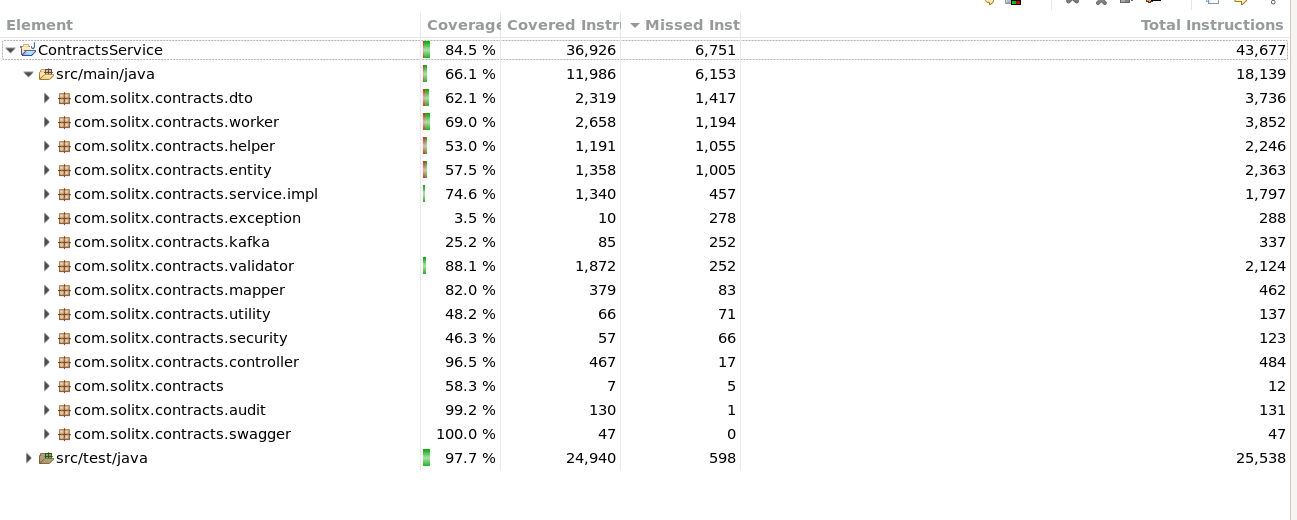
A code coverage report is used in software development to measure the extent to which the source code of a program is executed during testing.
-
It helps ensure that the tests adequately cover the codebase, thereby identifying parts of the code that are not tested.
-
This can improve the quality and reliability of the software by ensuring that all parts of the code are exercised and tested.
Below table explains the number of test cases and code coverage for all the modules.
|
|
|
BusinessEvents Service |
59 |
72.1 |
Contracts Service |
594 |
84.5 |
Ledger Service |
38 |
65.3 |
PaymentChannels Service |
195 |
79.1 |
Products Service |
40 |
71.8 |
Profile Service |
155 |
86.1 |
Transactions Service |
63 |
77 |
Markets Service |
53 |
65.8 |
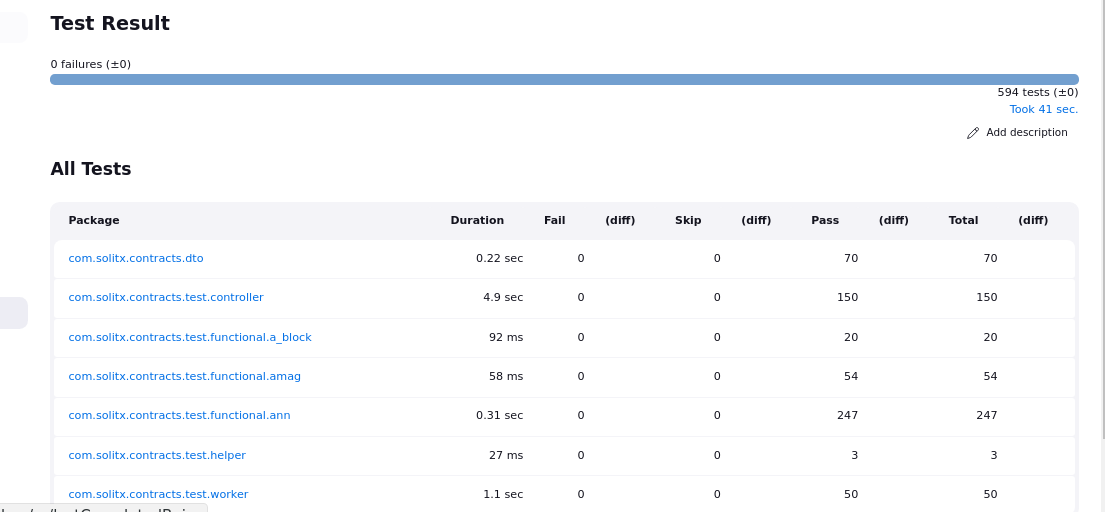
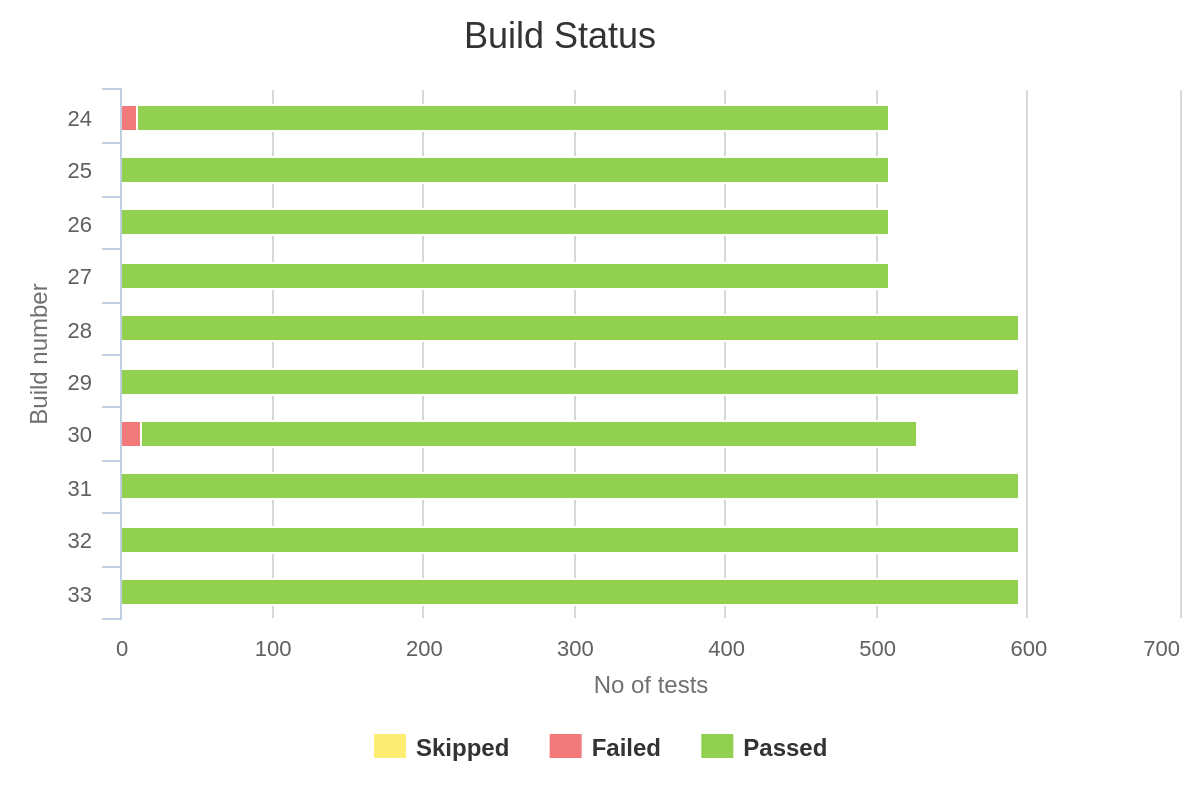
Below are the sample test reports of contracts module
2. JMeter report
Key metrics in JMeter reports
-
Samples:The total number of requests sent during the test. -
Average:The average response time for the requests. -
Median:The middle value of the response times, useful for understanding the typical response time. -
90% Line (90th Percentile):Indicates that 90% of the response times are below this value, helping to identify outliers. -
Min:The minimum response time recorded. -
Max:The maximum response time recorded. -
Error percentage:The percentage of requests that resulted in errors. -
Throughput:The number of requests processed per second/minute, indicating the load capacity. -
KB/sec:The amount of data transferred per second, useful for understanding bandwidth usage.
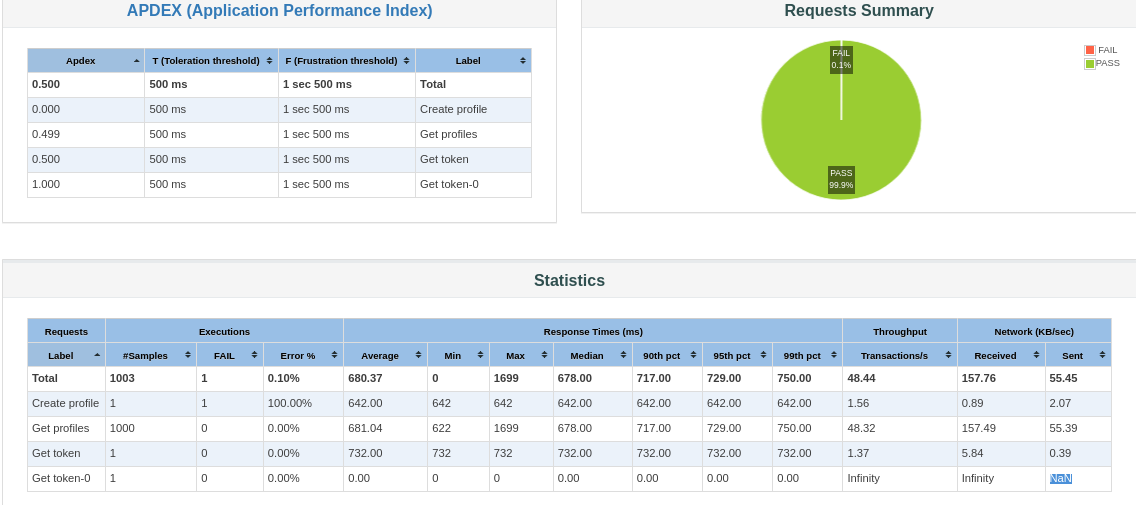
Performance evaluation
-
Low failure rate
-
The overall failure rate is 0.45%, which is low and indicates good reliability.
-
-
Response times
-
Average response time is around 3 seconds, which is acceptable for many applications.
-
The maximum response time is quite high (131143 ms), indicating some outliers that could be affecting performance metrics.
-
The median response time (704 ms) is well within acceptable limits.
-
-
Percentiles
-
The 90th percentile is around 8 seconds, suggesting that most requests complete within this time frame.
-
The 95th percentile is around 16 seconds, indicating that a small percentage of requests take significantly longer.
-
The 99th percentile is around 32 seconds, highlighting some extreme cases that need to be investigated.
-
-
Endpoint-specific performance
-
Create Profile:Only one request was made, which is not enough to draw significant conclusions. -
Get Profiles:This endpoint has a 0.45% failure rate and an average response time of 3022.61 ms, which is generally good but has some high outliers. -
Get Token:Only one request was made with a response time of 875 ms, which is acceptable.
-
-
Conclusion
-
Overall Performance:The application performs well with a low failure rate and acceptable average response times. However, there are some high outliers that need further investigation.
-
3. Security testing report
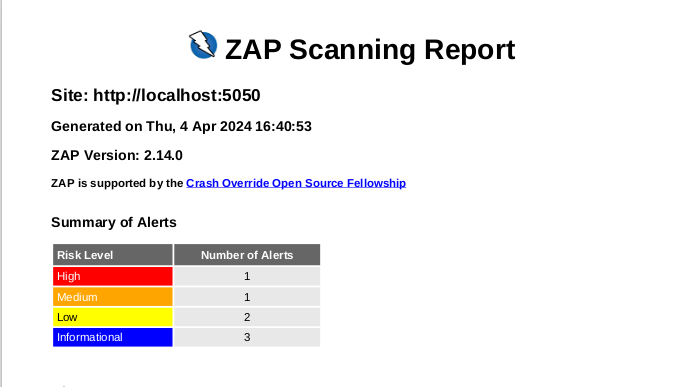
OWASP ZAP (Zed Attack Proxy) is an open-source web application security scanner. It is used for finding security vulnerabilities in web applications during development and testing phases. ZAP reports provide detailed information about the security issues discovered during scans, helping developers and security teams to identify and mitigate potential threats.
Key components of a OWASP ZAP report
-
Overview
-
Scan Summary:General information about the scan, including start and end times, duration, and the number of alerts found. -
Context Information:Details about the scope of the scan, including the target URLs and any included or excluded parameters.
-
-
Alerts
-
Alert Summary:A high-level summary of the alerts, categorized by risk level (e.g., High, Medium, Low, Informational). -
Alert Details:Detailed information about each alert, including:-
Alert Name:The name or type of the vulnerability (e.g., SQL Injection, Cross-Site Scripting). -
Risk Level:The severity of the vulnerability (High, Medium, Low, Informational). -
Description:A description of the vulnerability, explaining what it is and why it is a security concern. -
Instances:Specific instances where the vulnerability was found, including the affected URLs and parameters. -
Solution:Recommended actions to fix or mitigate the vulnerability. -
Reference:Links to additional resources or documentation related to the vulnerability. -
Evidence:Examples of the data or behavior that demonstrate the presence of the vulnerability.
-
-
The table below provides details about the alerts received for the modules
|
|
|
|
|
Contracts Service |
1 |
1 |
||
PaymentChannels Service |
1 |
1 |
1 |
1 |
Profiles Service |
3 |
5 |
1 |
|
Products Service |
1 |
3 |
||
Transactions Service |
1 |
1 |
||
Ledgers Service |
3 |
1 |
1 |
|
Markets Service |
3 |
Utilizing SonarQube for code quality checks, Mockito for mock tests, and automated testing practices ensures the development of high-quality software solutions
By combining SonarQube for code quality checks, Mockito for mock tests, and automated testing practices, development teams can achieve greater code quality, maintainability, and reliability in their software solutions.